If one or more of our Conversion events, e.g., "ReaktionRevenue" custom conversion events, have a "Needs Attention" disclaimer, then below you can find the most common reasons and how to fix them.
IMPORTANT: Those Needs Attention issues will not disappear historically. Only going forward after being resolved.
So if you view a month in Google Ads, where it was not resolved in the first 3 days of that month, then it will show as "Needs Attention" still. If you change the data in Google Ads to e.g., "Last 7 days", where it has been resolved in this period. The "Needs attention" issue will disappear.
Needs attention notification:
Any issues relating to the "API-configuration" or "Mismatched enhanced conversion configuration":
Please check and make sure "API" is enabled for "Enhanced conversions". All our conversion events need to have this setup. Please see this guide:
Link to guide: Troubleshooting: Google Ads tracking: "Turn on enhanced conversions"
Needs attention notification:
"Turn on enhanced conversions for leads"
The first error is because you haven't accepted "Google Ads enhanced conversions for leads" (the first error). It can easily be fixed by following this guide (just a checkmark in your Google Ads account):
Link to guide: https://reaktion.freshdesk.com/a/solutions/articles/101000476900
Needs attention notification:
Can't adjust new conversions
If you experience our Reaktion conversion events in Google Ads "Needs Attention" and the subject of the attention is: "Conversions not found. Then you should just disregard this "issue". We use this endpoint to power our "Conversion Booster" to ensure 100% tracking coverage and rely on being informed about the "Conversions are not found" notification from Google Ads to export conversions into our conversion booster.
Needs attention notification: Offline conversion data issues are affecting performance
"Can't find conversion/Conversions not found"
If you see our Reaktion conversion events in Google Ads, with a "Needs Attention" warning, and the subject of the attention is: "Can't find conversion/Conversions not found". - Then you should just disregard this "issue". We use this endpoint to power our "Conversion Booster" to ensure 100% tracking coverage and rely on being informed about the "Conversions are not found" notification from Google Ads to export conversions into our conversion booster.
Needs attention notification:
"Click not found"
We export Google Click IDs that are expired/mistaken / invalid in some other way. In this case, we always repeat the conversion export. But the error is counted anyway (even though we successfully export the conversion after that). It's safe to ignore that error.
Needs attention notification:
"Tag is missing user-provided data"

This error usually concerns only the Form Submissions (newsletter signups), which Reaktion does not track - so this error can be ignored.
Needs attention notification:
"Ensure that your conversion action tag is set up correctly"
The error, "Ensure that your conversion action tag is set up correctly", can sometimes pop up simply because there have not been that many orders in recent days, hence no recent tag pings.
Needs attention notification:
(..) Tag and API-order-ids dosen't match. Tags on your website and API dosen't send the same order-ids
When you have multiple webshops connected in Reaktion, you need to configure for each of your shops which ad accounts they should send server-side data to. This error happens because we are sending server-side data from a shop that this ad account doesn't run ads to.
Please see this guide and adjust so only ad accounts that are running ads to a webshops is recieving serverside data from this webshop.
Link to guide: Select "Ad Account(s)", a webshop is sending server-side data to


Needs attention notification:
Identifiers or iOS URL parameters are too old
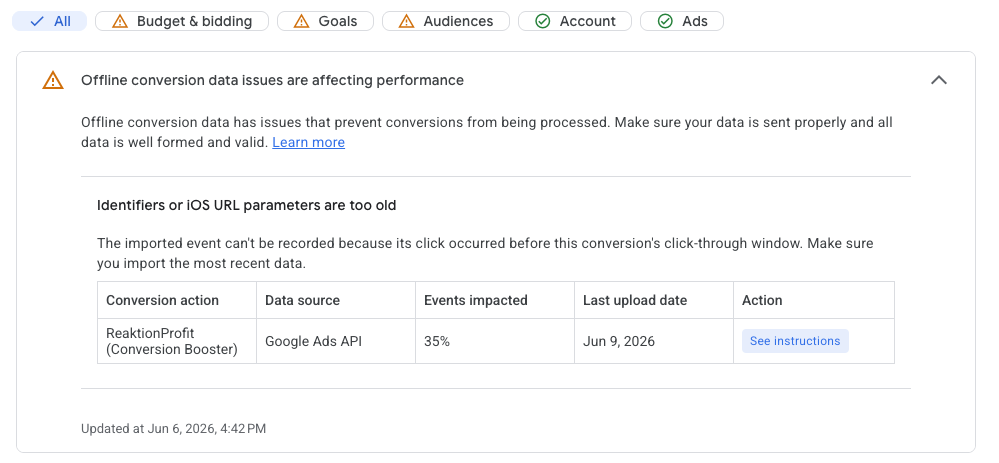
This warning can be disregarded. When encountering this error, Reaktion usually either uses another available click or sends user data (email/phone/address), so no conversion would be lost.
Was this article helpful?
That’s Great!
Thank you for your feedback
Sorry! We couldn't be helpful
Thank you for your feedback
Feedback sent
We appreciate your effort and will try to fix the article