After connecting Meta Ads to a Reaktion account, it is essential to manually review and confirm all Reaktion custom events in the Meta Events Manager
In the Events Manager, you might see an error message like the one below:

Please follow the steps below to review and confirm the Reaktion events:
1) Please click on Review, and then click I acknowledge to review the Reaktion custom events:

2) Select all Reaktion custom events and click Next:

3) Select Confirm the custom event and click Confirm:

Now, you have successfully reviewed and approved custom Reaktion events. They can now be used to create custom columns or as a campaign objective.
There are two alternate methods to approve the events:
1) You can also do this from your dataset overview by clicking on the red triangle:
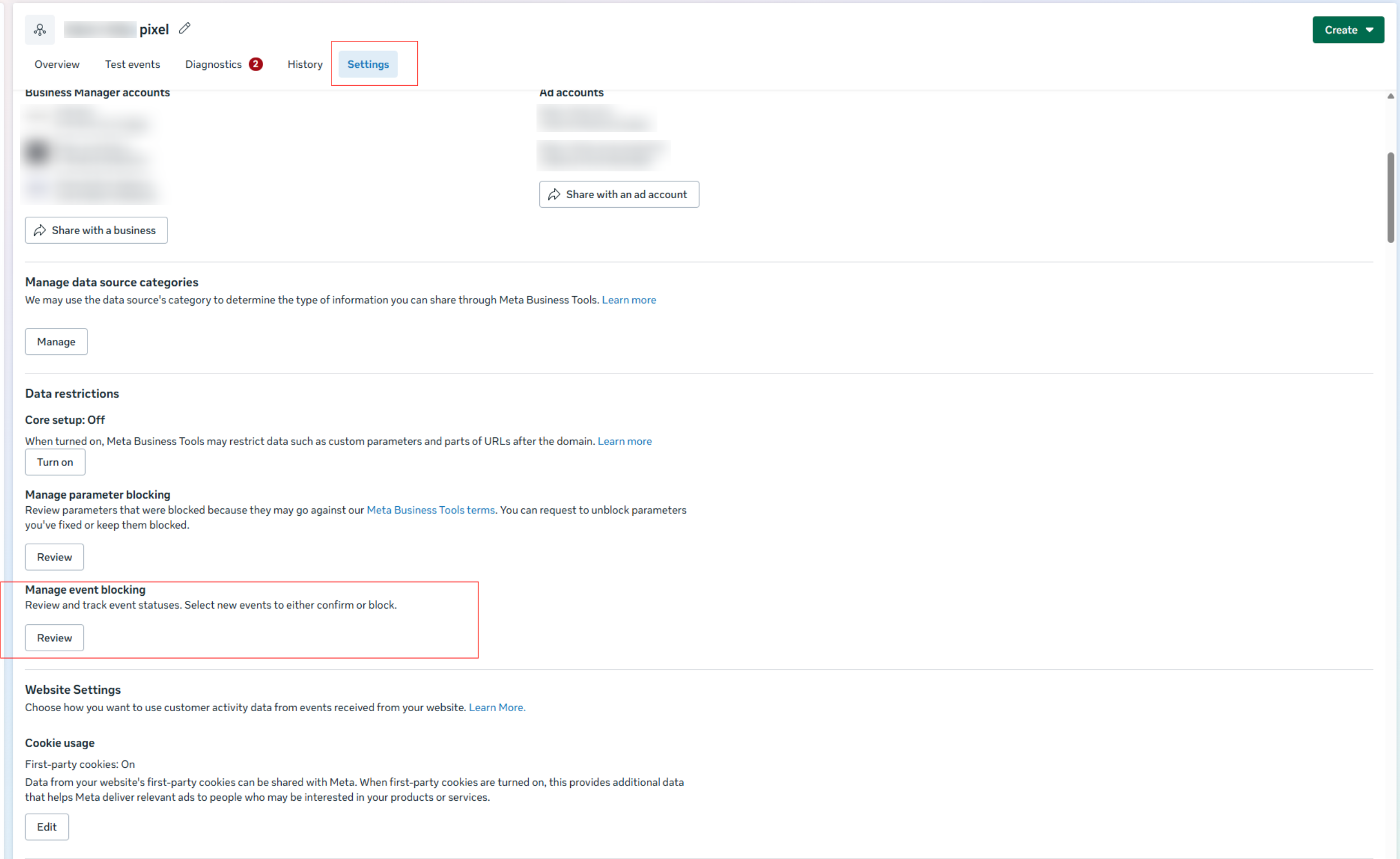
2) Another place to find the events to approve would be to navigate to Settings > Manage event blocking and click on 'Review':
Was this article helpful?
That’s Great!
Thank you for your feedback
Sorry! We couldn't be helpful
Thank you for your feedback
Feedback sent
We appreciate your effort and will try to fix the article